Tuesday, January 31, 2012

the waters have indeed parted!


Leave it to the Dutch!!
> No, your eyes are not deceiving you - the waters have indeed parted! This incredible "sunken" bridge
> located in the Netherlands is giving visitors a unique way to access a  beautiful 17th Century Dutch fort.
>
> Designed by RO & AD Architects, the Moses Bridge literally parts the  waters that surround the fort,
> allowing pedestrians to pass through. The bridge is made from sustainable Accsys Technologies
> Accoya wood, which is both FSC and PEFC certified.

> A series of moats and fortresses were built over the West Brabant Water Line region of the Netherlands
> during the 17th century in order to provide protection from invasion by France and Spain . Fort de Roovere
> was surrounded with a shallow moat that was too deep to march across, and too shallow for boats.
>
> In turn the earthen fort had remained protected -until now. From afar, the Moses Bridge is invisible to the eye. The flow of the
> moat appears continuous, as the water level remains at the same level, reflecting the surrounding foliage. As visitors approach the fort,
> the bridge appears as a break in the water with its sloping walls containing it. First lying flush with the earth, the bridge then descends deeper into
> the ground. Lined with wood sheet piling for walls, the deck and stairs sit  between. The bridge and its components
 have been made from sustainable hardwood that is Cradle to Cradle Gold  certified.
>
> The Accoya wood is also treated with a nontoxic coating, protecting it from fungal decay and increasing its durability - an ideal material for a sunken bridge.
> Like a dam, the walls of the bridge hold the waters of the moat back, and like Moses, the bridge parts the  waters so that pedestrians may pass.

Monday, January 30, 2012

How To create shortcuts on the desktop?


To create a shortcut on the desktop to a folder, program or file, there are two methods to choose from.
Method 1

  1. Locate the item that you want to create a shortcut for.
  2. Right-click on the item, click Send To , and then click Desktop (create shortcut)


3. The shortcut icon appears on your desktop


Note: The shortcut is identified by a small arrow at the bottom of the icon.

Method 2
To create a shortcut on the desktop to file shares:
  1. Right-click an open area on the desktop, point to New, then click Shortcut.
2. Click Browse and Locate the network drive to which you want  to create a shortcut, click on the network drive, and then click Next

 3. Type a name for the shortcut. If a Finish button appears at the bottom of the dialog box, click it.

4. The shortcut icon appears on your desktop.
 Advantage
The boot time of your computer will be reduced by using network shortcuts instead of active network drive connections which will not be automatically launched.
Helpful Tips:
  • To modify settings for a shortcut, right-click on the shortcut, and then click Properties. Settings that can be modified include the key combination used to start the shortcut.
  • To delete a shortcut, right-click the shortcut, and then click Delete. Or, you may drag the shortcut to the Recycle Bin. When you delete a shortcut to an object, the original object is not deleted.

Sunday, January 29, 2012

One in a Billion Shot

Imagine being in the right position in the right time to get one of these pictures !


  1. Mmmmmm this kitty kat is tasty

2. You got a little something in your nose let me get that for you!

3. Give me that Worm its MINE!!!!!!!!!!!!!!!!!!!!!!!!!


4. Nothing better then some nice fresh milk straight out of the milk maker :)


5. I don't agree with this sign, No Dogs allowed , CrAzY

6. Oh No, what happened? help SoS some one out there help me 


Live every day with enjoyment - we don't know what tomorrow will give us!

Saturday, January 28, 2012

Buying a Motorcycle in France

Well in this post we will post the names of Motorcycles i like as well as other information to help me make my decision easier to buy a motorcycle here in France

Motorcycles:

  1. VMAX 1200 (Mad Max Motorcycle)
  2. Yamaha Virago 700 and up
  3. Yamaha XJ900S Diversion -this is a good practical motorcycle that is reliable but not sexy
  4. Suzuki VX 800
Motorcycles not to get:
  1. Kawasaki 750 Zephyr

Websites:
So far this is the best site to actually find the motorcycles
this site doesnt have many motorcycles (used) for sale on it but it has some nice options to see what motorcycles are worth etc
http://www.moto85.com

Adobe Acrobat Pro - Batch processing

How to access the batch processing function in Adobe Acrobat Pro for manipulating PDF documents?
Sometimes, you may need to convert files into PDF files with a security password preventing from further PDF modification or whatever. This typical example may highlight one of the most powerfull (and hidden function) of Adobe Acrobat Pro.
To display the batch processing menu
  1. go to the Advanced menu from the menu bar and
  2. select the Document processing menu item and
  3. then Batch processing submenu.
From the Batch Sequences dialog you can select a pre-existing sequence or define your own sequence which will be saved and then display in the list of defined sequences which can be run.
If you click on the New Sequence button you will be first displayed a dialog requesting to give a name for this new sequence and then you will have access to the commands which can be implemented in the sequence.

Friday, January 27, 2012

Dangers of ICE


Here is a special health note that was just released by Health & Human Services.


When you drink vodka over ice, it can give you kidney failure.
When you drink rum over ice, it can give you liver failure.
When you drink whiskey over ice, it can give you heart problems.
When you drink gin over ice, it can give you brain problems.
Apparently, ice is really bad for you.
Warn all your friends.

Thursday, January 26, 2012

How to compare 2 docs in WORD


How to compare easily two versions of the same Word document?
If several persons work on the same document, it’s necessary to manage and organize its editing. While collecting all change proposals it’s good to use the word function Track changes. There are also some smart tools for collaboration which help you to avoid having two or more versions of the same document.
But what to do if it happens anyway?
To compare two versions of the same document by yourself (without any special tool) it’s not easy and almost impossible. WORD has a built-in function for this case!
This function could be very useful, if you missed to activate Track Changes.

A tip for power users: You can use this function also to compare other text files like results of SQL-queries, comma/tabulator separated values (CSV/TSV) and so on.

  1. Open WORD on your computer and go to the ribbon tab Review. In the section Compare select the menu item Compare.
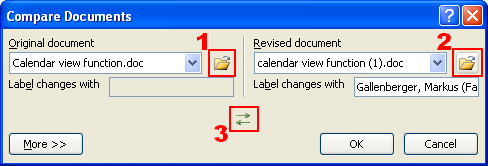
  2. Choose your documents in the section 1 as original and in the section 2 as revision. If you already opened the related documents you can select them in the drop-down menus. Otherwise you have to use the directory icons (Open).
    The base for the comparison of these two documents is the original document. You can exchange these two documents with the green arrows (3) if you interchanged them while selecting.

 
You can change the search for differences by additional settings. Please click on More and finally confirm with OK.

3. Then you will get listed all differences.


On the left you can see the list of all differences.
In the middle you can see all changes in the context.
At the right side you will get shown the original text (in the upper section) and the revised version (in the section below).